Laboratory · Puzzle walkthrough
Camera, Computer Password and Fingerprint Door
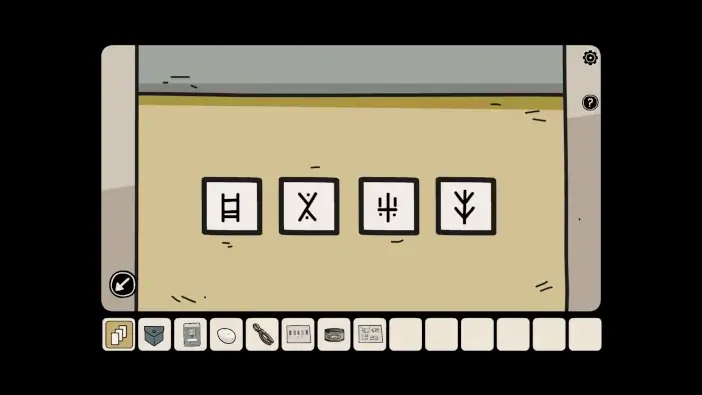
Quick answer
The computer password is 532009, printed on the access card. First use the camera with its night-vision lens and the lights off to learn the yellow-box symbols and get the USB. Print the finger from the computer’s image file. The locked door needs restored power, the access card and that printed finger.
On this page
Before you begin
Before you begin
- Take the recorder from the cat cabinet and the night-vision lens plus access card from the fly chest.
- Take the light switch from the Laboratory drawer. Keep the red-box wiring note and the pliers.
Follow the clues
- 01
Set up the recorder and turn off the lights
Fit the light switch in the white-cat room if it is still missing. Put the recorder on the tripod, attach the night-vision lens, then use the switch to darken the room. Inspect the camera view again.
You’ll know it worked: The camera reveals figures that are not visible in normal room lighting.
- 02
Read both figures and unlock the yellow box
Tap the left figure to reveal its pair of runes, then the right figure for the other pair. Keep all four in left-to-right order. Use the arrangement pictured above on the yellow box in the brown-cat room. Collect the USB drive and tweezers.
You’ll know it worked: The USB is available for the computer; keep the tweezers for the crab.
- 03
Log in with the number on the access card
Insert the USB into the computer. Inspect the access card in your inventory to read 532009, then enter it with the computer’s on-screen keys. Open the cloning material and select the image file.
You’ll know it worked: The cloning image and its Print action are accessible.
- 04
Print and pick up the finger
Select Print. Leave the computer close-up and collect the replica finger from the 3D printer. Seeing the image on the screen is not the same as collecting the printed object.
You’ll know it worked: The replica finger is in your inventory.
- 05
Reconnect the door’s power wires
Use the pliers to cut the cables beside the locked door. Follow the note and the completed arrangement below: top red to bottom purple, green to yellow, purple to blue, yellow to red, and blue to green. After joining every pair, operate the switch on the left.
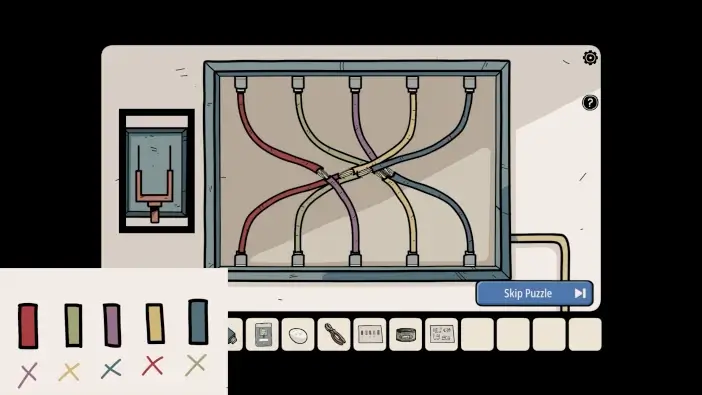
Follow the note’s color pairs rather than joining identical colors. Game image © Dark Dome; source capture by Play Games Wiki. View the source walkthrough ↗ You’ll know it worked: The door’s access panel has power.
- 06
Use both credentials at the door
Insert the access card into the powered panel and apply the replica finger to the fingerprint reader. Enter the unlocked room and open the box containing the can opener, cocktail umbrella and duck arithmetic clue.
You’ll know it worked: The duck room and its supplies are accessible.
If you’re still stuck
Why does the camera view look ordinary?
Check all three setup conditions: recorder on the tripod, night-vision lens attached, and the room lights switched off. Then inspect the recorder again.
The computer accepted 532009, but I cannot open the door.
The password only gives access to the computer. Print and collect the finger, repair and activate the power circuit, then use both the card and finger at the door.
Should I connect wires of the same color?
No. The inventory note gives cross-color pairs. Use the completed panel image and the pair list in the wiring step.
Is the camera’s shadow clue the hidden-shadow collectible list?
This sequence is for the yellow-box rune lock. It is not a replacement for the separate list of collectible hidden shadows.
Sources and scope
Based on public mobile walkthroughs and the linked game captures. We have not played through this sequence ourselves or verified Steam-version parity. Checked 2026-09-23.